|
See the title.
This question is marked "community wiki".
|

|
This is an updated answer. Note: This information changes once in a while, so please try to update it when new info comes along. Before you can get paid, the following must be true: After receiving your
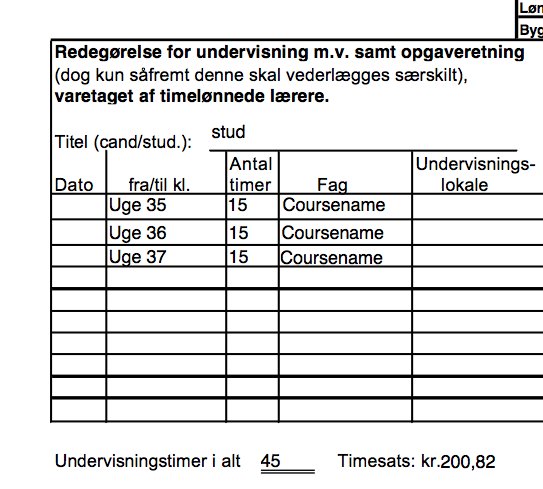
contract, sign it and send it to To get paid, first download Timeseddel til timelønsansatte SUL version 29-11-2013 ny kontostreng.xls. It's in Danish and may be updated at some point, in which case the administrative staff will let you know. Then open it and fill out these fields:
Put an X to the left of "Hjælpelærer, Opgaveretning" in the bottom. Also write the date in the "Dato" field. Now comes the fun part: Describing your work! A typical TA job consists of 135 hours, so you have to distribute that. You can only get paid for one month with a single Excel file. For a typical TA job, this means you have to fill out three Excel files. I (Niels) usually put 52 hours in the first month, 52 hours hours in the second month, and 31 hours in the third month, totaling the official 135 hours. You can either send one file every month, or you can send all files at the end of the job. You need to fill out the middle of the file. The first column contains the date, the second and third column contains the start and end time, respectively, and the fifth column contains the work description. To make the administration happy, you could record precisely all work hours, but fortunately they fully accept imprecise measurements as long as the total is the same, so I just put in: until I have achieved the wanted number of hours. Note: If you have more than one TA job in the same block, they will complain if you claim that you worked at overlapping time intervals. One way to overcome this is to only register hours for one TA job every month. Another way is to dedicate certain days within a month to each job. Congratulations, you have now filled in the Excel file. Before you send it, consider whether you want it on your hovedkort -- this is probably what you want if the TA job is your main job -- or bikort. If you want it on your hovedkort, be sure to mention it in the email. The Excel file says to send an email to some adm.ku.dk email address, but that doesn't help you. Finally, send the email to personale@chem.ku.dk, which will contact the necessary UCPH units and pay you at some point. If they receive your email before or at the fifth day in the month, they will pay you at the end of the same month. If they receive your email before or on the 21st day in any given month, they will pay you in the middle of the next month. Otherwise, the rules for the next month apply. This approach worked for me the last time i was a TA. If you need more help, the people at personale@chem.ku.dk are helpful (they have always been quick in answering my questions).
link
This answer is marked "community wiki".
|

|
As a teaching assistant at DIKU, you are paid by the hour. To obtain your salary, you have to report how much you've worked on your timesheet. The official timesheets are found on KUnet, but beware, they're in a proprietary format (.xls). An alternative timesheet in PDF-format (with form elements) can be found here (on omploader, a file upload site). Filling out the timesheet The timesheet is in danish, so here's a short guide to filling it:
Deadlines, contact persons and other information Once you have filled out your timesheet and signed it, send it off to Hanne Eglund - you can find more information such as her e-mail here. If you have any questions, you can also ask Hanne. You are to send in your timesheets no later than the 20th each month (reporting late have worked for me, but I only tried it once). Your pay is generally available on your account in the middle of the following month. In case you want to use your fradrag / tax credit (hovedkort/frikort) you have to call a number for "Lønsektionen" (salary office), that Hanne can supply you with. Checked boxes under the heading "Ved beregning af kildeskat ønskes anvendt" are ignored, beware. You have to call this number each time you need to change your tax reporting. In case of problems (when they don't deduct your tax credit prior to calculating your tax payment), call the number Hanne supplied you with and tell them that you want them to pay you 'regulering' - tell them that you get your pay one month later than the month you're reporting - and remember, be nice, it really makes a big difference when talking to 'Lønsektionen'. |